
MyCupra APP
4,6
MyCupra APP
4,6
MyCupra APP
4,6
MyCupra APP
4,6
MyCupra APP
4,6
A connected car experience shaped by clarity and control
A connected car experience shaped by clarity and control
A connected car experience shaped by clarity and control
A connected car experience shaped by clarity and control
A car experience shaped by clarity and control
A UX/UI case study for a connected car ecosystem
A UX/UI case study for a
connected car ecosystem
A UX/UI case study for a connected car ecosystem
Disclaimer
To respect confidentiality agreements, some details, metrics, and internal documentation have been simplified or omitted. The insights shared here are my own and don’t necessarily represent the views of Cupra.
Disclaimer
To respect confidentiality agreements, some details, metrics, and internal documentation have been simplified or omitted. The insights shared here are my own and don’t necessarily represent the views of Seat.
Getting started
Getting started
A digital extension of the car
MyCUPRA is where performance meets emotion. It's a brand that lives at the intersection of technology, design, and pure driving experience. The app needed to be an extension of that philosophy—giving drivers instant access to their car's status, remote controls, driving data, and connected services, all from their phone.
A digital extension of
the car
MyCUPRA is where performance meets emotion. It's a brand that lives at the intersection of technology, design, and pure driving experience. The app needed to be an extension of that philosophy—giving drivers instant access to their car's status, remote controls, driving data, and connected services, all from their phone.
A digital extension
of the car
MyCUPRA is where performance meets emotion. It's a brand that lives at the intersection of technology, design, and pure driving experience. The app needed to be an extension of that philosophy—giving drivers instant access to their car's status, remote controls, driving data, and connected services, all from their phone.
Challenge
Challenge
Complexity feel effortless
Here's the thing: CUPRA's identity is bold, minimal, futuristic. It's what makes the brand instantly recognizable. But we were dealing with loads of complex information—vehicle diagnostics, route planning, charging data, remote controls. The challenge? Keep it unmistakably CUPRA while making everything feel intuitive and immediate. Consistency can't come at the cost of usability. And usability can't water down the brand.
Complexity feel effortless
Here's the thing: CUPRA's identity is bold, minimal, futuristic. It's what makes the brand instantly recognizable. But we were dealing with loads of complex information—vehicle diagnostics, route planning, charging data, remote controls. The challenge? Keep it unmistakably CUPRA while making everything feel intuitive and immediate. Consistency can't come at the cost of usability. And usability can't water down the brand.

Visual language
Visual language
Visual language
Bold, minimal, unmistakably CUPRA
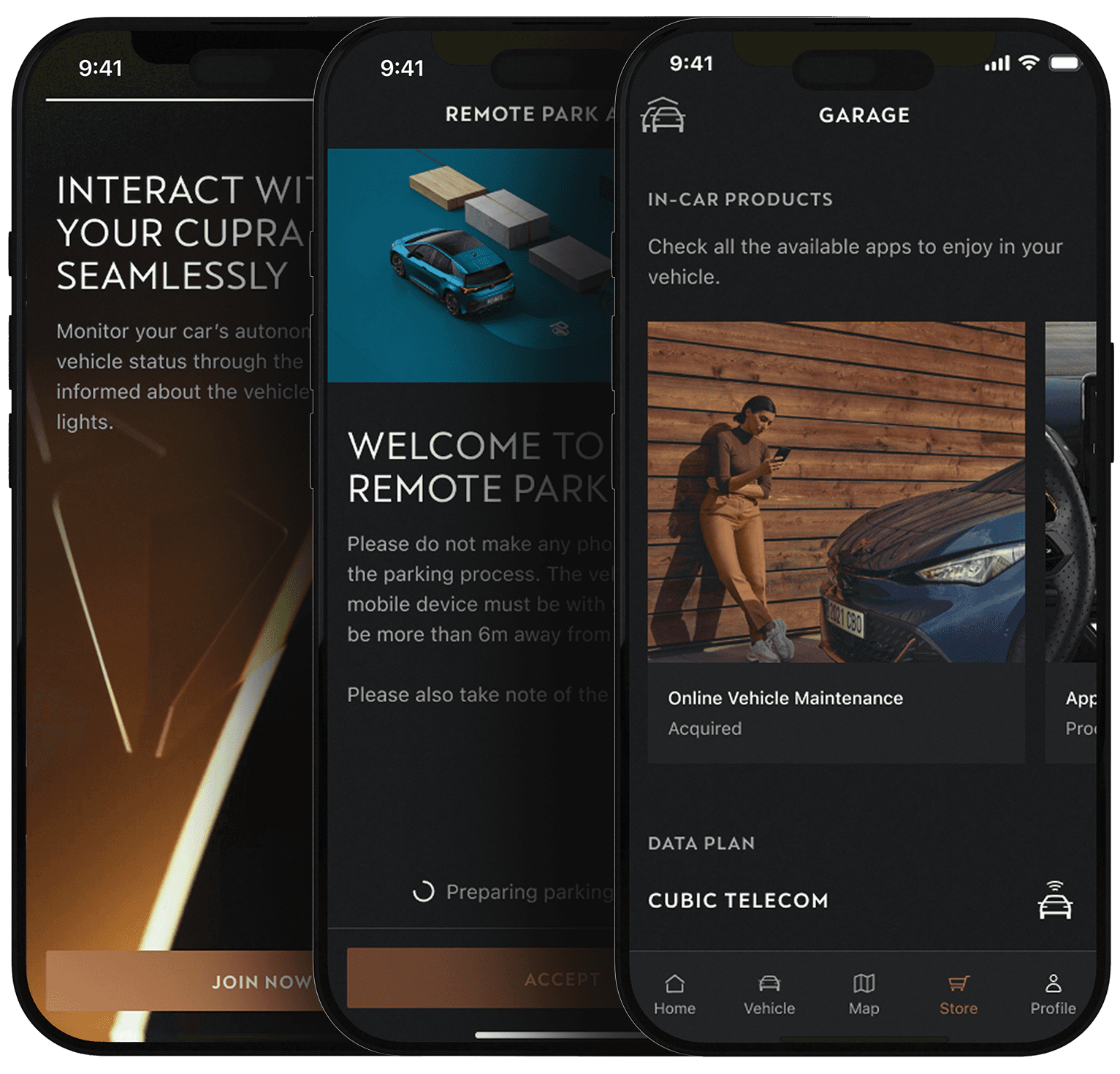
The visual language is bold without being loud. We leaned into high contrast to make priorities crystal clear. Dark backgrounds let the content breathe and put focus where it belongs. Typography isn't just text—it's hierarchy, it's rhythm, it's structure.
Spacing matters. We used it deliberately to separate, group, and guide attention. White space isn't empty space—it's intentional.
Motion? Only when it adds meaning. Every animation had to earn its place by improving understanding or providing feedback. If it didn't serve the user, it didn't make the cut.
Bold, minimal, unmistakably CUPRA
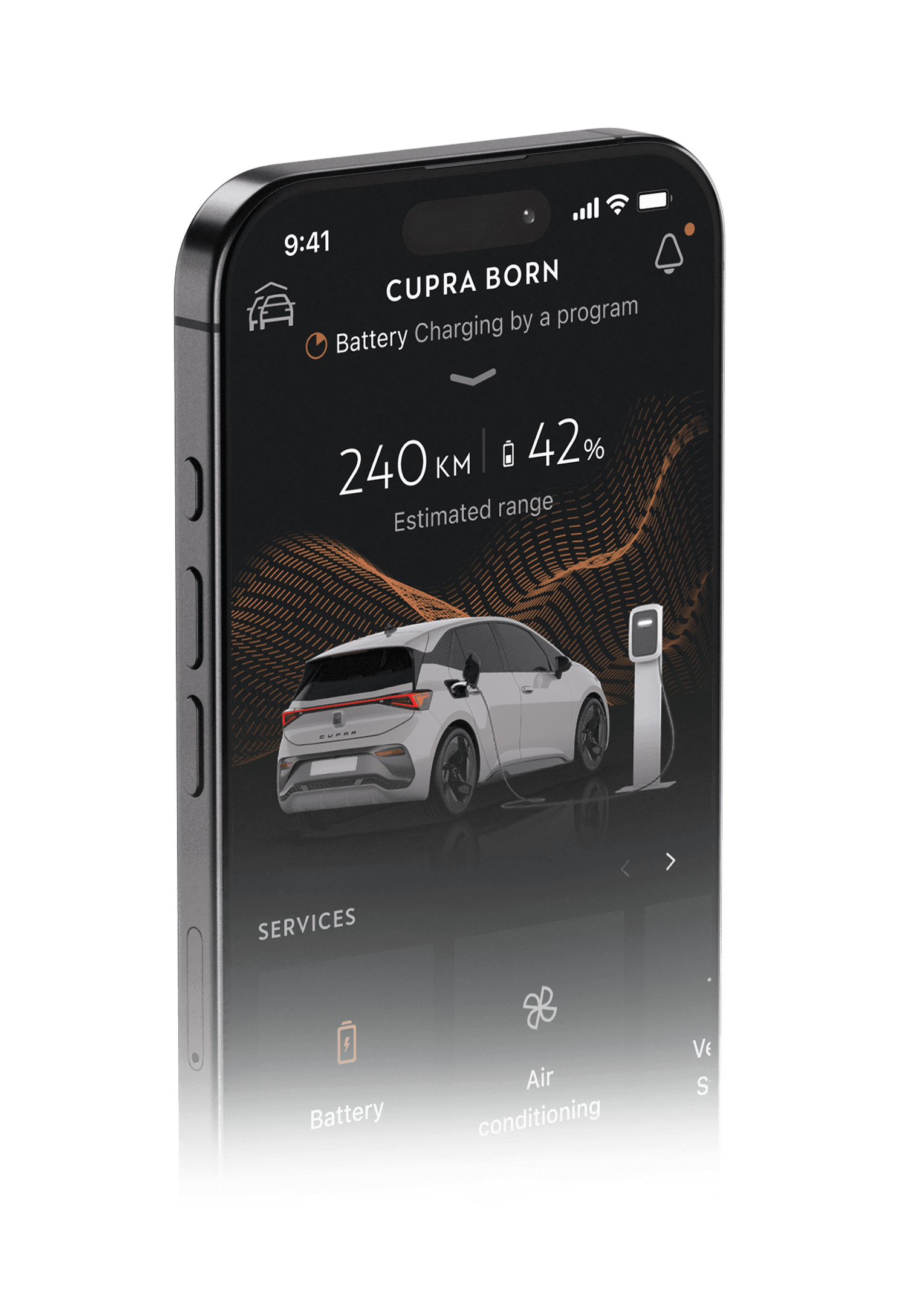
The visual identity reflects CUPRA’s shift from a performance badge of SEAT to an independent, tribal, and emotionally driven brand centered on the driver experience and progressive design.
Rather than relying on decorative elements, the interface is built through careful reduction. Visual contrast is used to establish clear priorities, typography defines hierarchy and structure, and spacing becomes an active tool to separate, group, and guide attention. Motion is introduced only where it supports understanding, reinforcing feedback without becoming a distraction.
Architecture
Architecture
One structure, multiple use cases
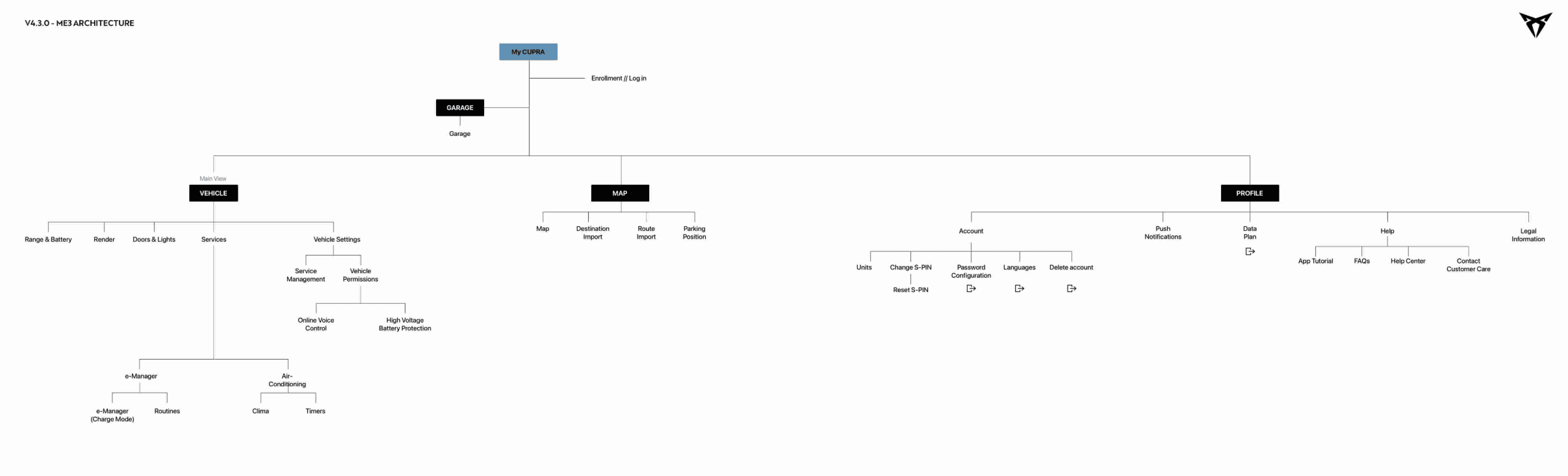
Critical information had to be immediately visible. No hunting, no deep navigation. We grouped actions around user intent—what do people actually want to do when they open the app? Check battery? Start the AC? Find their car?
By keeping navigation shallow and predictable, we made the experience fast and frictionless, while still flexible enough to grow with future features.
One structure, multiple use cases
The app architecture was designed to make critical information immediately visible, reducing the need for exploration or deep navigation. Actions are grouped around user intent, allowing people to quickly understand where to go and what to do, even during short and repeated interactions. By keeping navigation shallow and predictable, the experience supports fast decision-making while remaining flexible enough to accommodate future features.
Design system
Design system
New Component? Think twice!
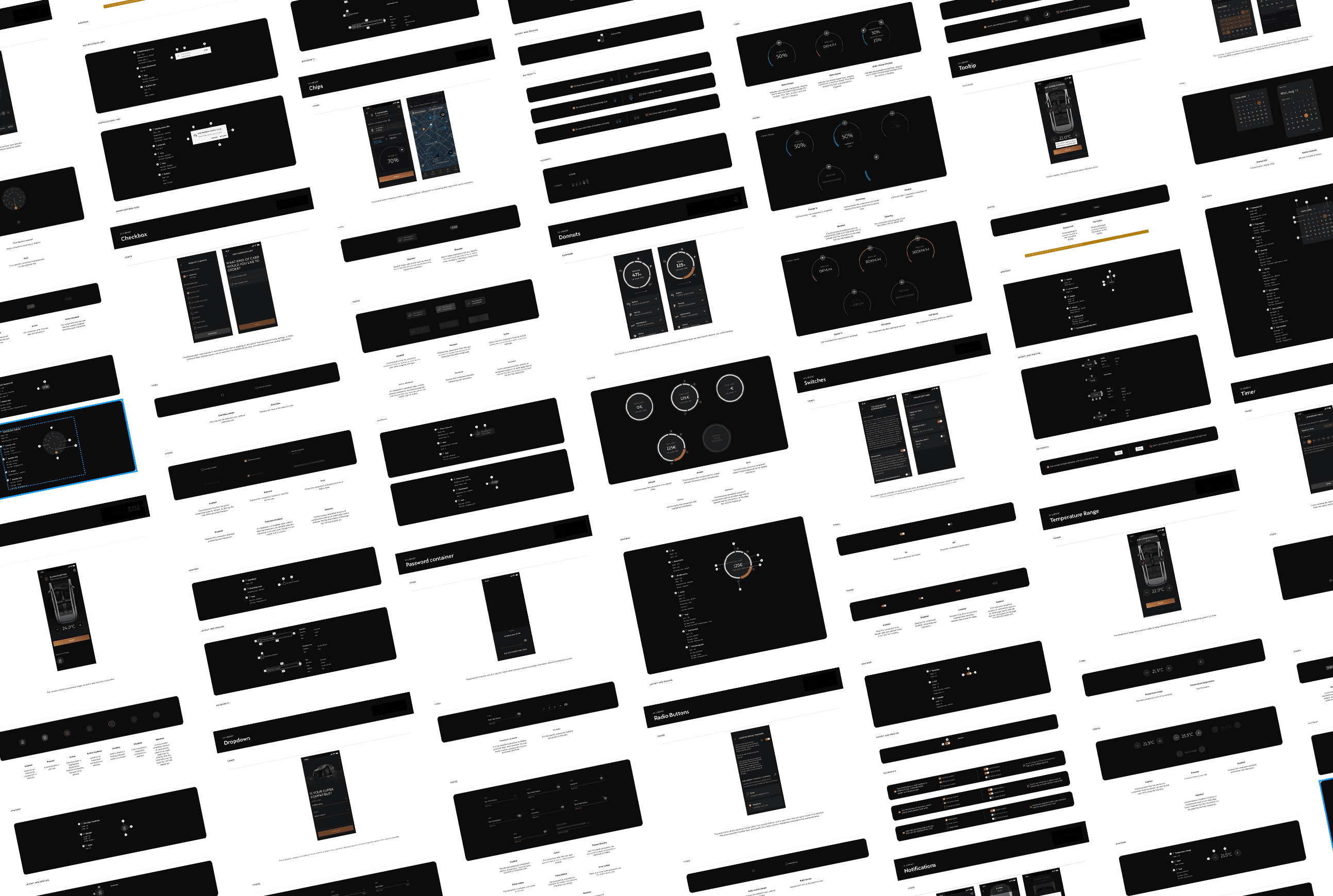
CUPRA's design system had over 200 components. With a rigid style guide that strict, it's easy to fall into the trap of creating new variants for every edge case. Before you know it, the system becomes bloated and impossible to manage.
Our approach? Reuse relentlessly. If a component could be adapted, we adapted it. This kept the system consistent, scalable, and maintainable. Less chaos, more craft.
New Component? Think twice!
With more than 200 components the Cupra's Design System it was built with a rigid Style Guide that fully express the brand's values. Multiple use cases can induce to create multiple variants of the same component making it redundant and unmanageable. The happy path was try to reuse all possible components to be more consistent and organized .
Final Design
Form meets function
With more than 200 components the Cupra's Design System it was built with a rigid Style Guide that fully express the brand's values. Multiple use cases can induce to create multiple variants of the same component making it redundant and unmanageable. The happy path was try to reuse all possible components to be more consistent and organized .
Final Design
Final Design
Form meets function
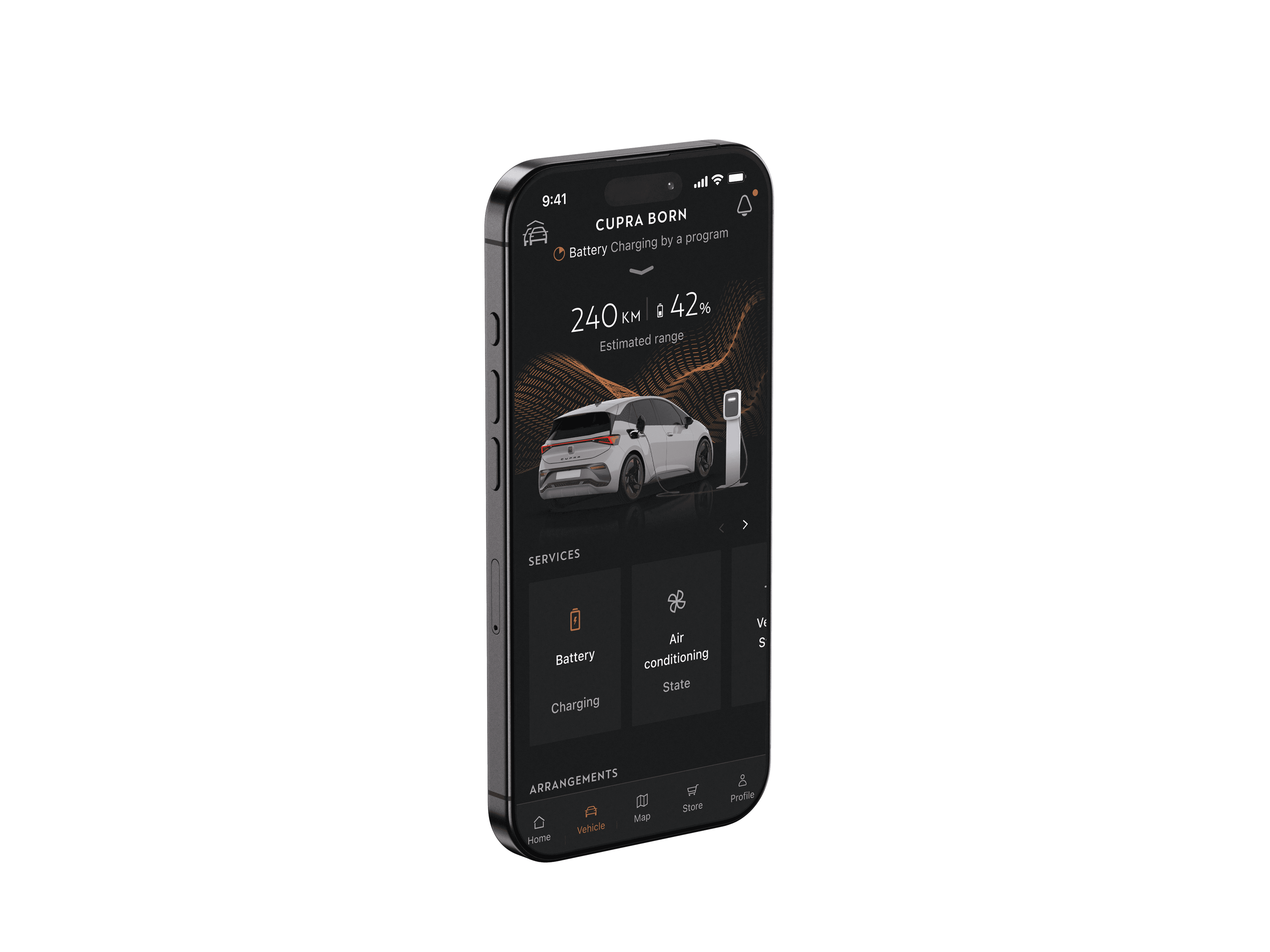
The interface follows CUPRA's DNA: dark, sophisticated, precision-focused. We worked with a deep charcoal base that lets critical information pop without fighting for attention. It's the kind of aesthetic that feels premium at first glance but functional when you actually use it.
The result? An interface that feels like it belongs in a CUPRA—premium, confident, and built for performance.
Form meets function
With more than 200 components the Cupra's Design System it was built with a rigid Style Guide that fully express the brand's values. Multiple use cases can induce to create multiple variants of the same component making it redundant and unmanageable. The happy path was try to reuse all possible components to be more consistent and organized .
Colors and gradients
Copper color (CUPRA's signature) are used sparingly for CTAs, confirmations, and moments that need emphasis. Status indicators use a clear system: green for active/healthy, amber for warnings, red for critical.
1
Typography
We used a strict type scale with clear hierarchy: large, medium headings for key stats (battery level, range), medium weight for labels, and smaller text for secondary info.
2


Cards and modules
They group related information and actions. No rounded corners to look sharply and ordered, drop shadows provide depth without clutter. Cards wants making it easy to scan and act fast.
3
Colors and gradients
Copper color (CUPRA's signature) are used sparingly for CTAs, confirmations, and moments that need emphasis. Status indicators use a clear system: green for active/healthy, amber for warnings, red for critical.
1
Typography
We used a strict type scale with clear hierarchy: large, medium headings for key stats (battery level, range), medium weight for labels, and smaller text for secondary info.
2
Cards and modules
They group related information and actions. No rounded corners to look sharply and ordered, drop shadows provide depth without clutter. Cards wants making it easy to scan and act fast.
3
Colors
Copper color (CUPRA's signature) are used sparingly for CTAs, confirmations, and moments that need emphasis. Status indicators use a clear system: green for active/healthy, amber for warnings, red for critical.
Typography
We used a strict type scale with clear hierarchy: large, medium headings for key stats (battery level, range), medium weight for labels, and smaller text for secondary info.
Cards and modules
They group related information and actions. No rounded corners to look sharply and ordered, drop shadows provide depth without clutter.
Cards wants making it easy to scan
and act fast.

Discovery
Discovery
Features from scratch
At some point, we needed to introduce features that didn't exist yet in the CUPRA ecosystem: Area Alerts and an EV Route Planner. There weren't many references to lean on, so we built them from scratch.
We started with a deep dive into competitors—automotive apps, mobility platforms, map-based services. A pattern emerged: critical decisions were often buried in settings or hidden behind cluttered interfaces.
Our goal became crystal clear: reduce friction, surface only what truly matters.
Features from scratch
At some point, we needed to introduce features that didn't exist yet in the CUPRA ecosystem: Area Alerts and an EV Route Planner. There weren't many references to lean on, so we built them from scratch. We started with a deep dive into competitors—automotive apps, mobility platforms, map-based services. A pattern emerged: critical decisions were often buried in settings or hidden behind cluttered interfaces. Our goal became crystal clear: reduce friction, surface only what truly matters.
Features from scratch
At some point, we needed to introduce features that didn't exist yet in the CUPRA ecosystem: Area Alerts and an EV Route Planner. There weren't many references to lean on, so we built them from scratch.
We started with a deep dive into competitors—automotive apps, mobility platforms, map-based services. A pattern emerged: critical decisions were often buried in settings or hidden behind cluttered interfaces. Our goal became crystal clear: reduce friction, surface only what truly matters.
Sketch and Benchmark
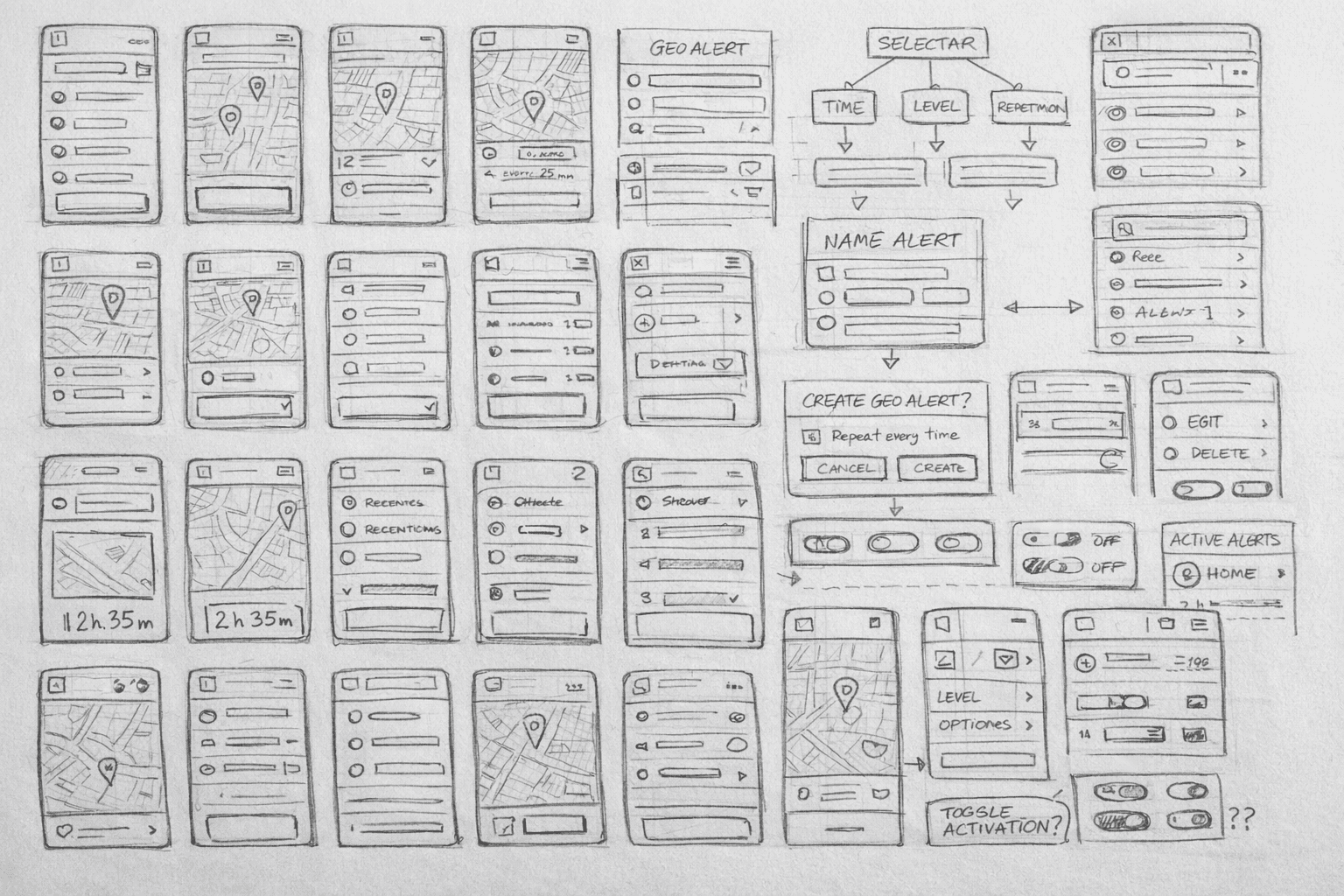
Before moving into visual design, we focused on structure and behavior. By benchmarking solutions across automotive and mobility apps, we identified a common issue: critical decisions are often hidden behind complex settings or overloaded interfaces. Our goal became clear — reduce friction and surface only what truly matters.
Here some sketches of the process.
Sketch and Benchmark
Before jumping into high-fidelity designs, we mapped out structure and behavior. Lots of sketches, lots of testing different flows. We wanted to get the logic right before making it look good.
Here some sketches of the process.
Sketch and Benchmark
Before jumping into high-fidelity designs, we mapped out structure and behavior. Lots of sketches, lots of testing different flows. We wanted to get the logic right before making it look good.
Area Alerts
Area Alerts
Area Alerts
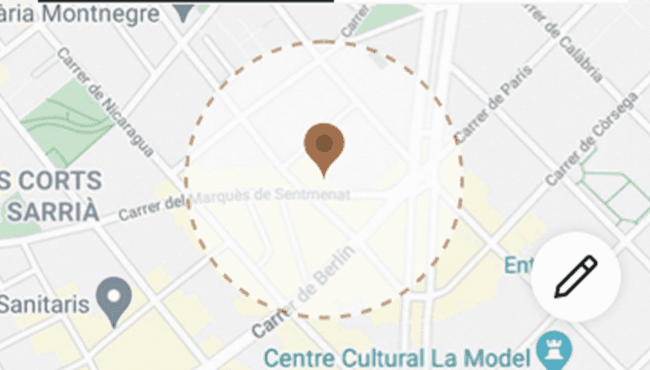
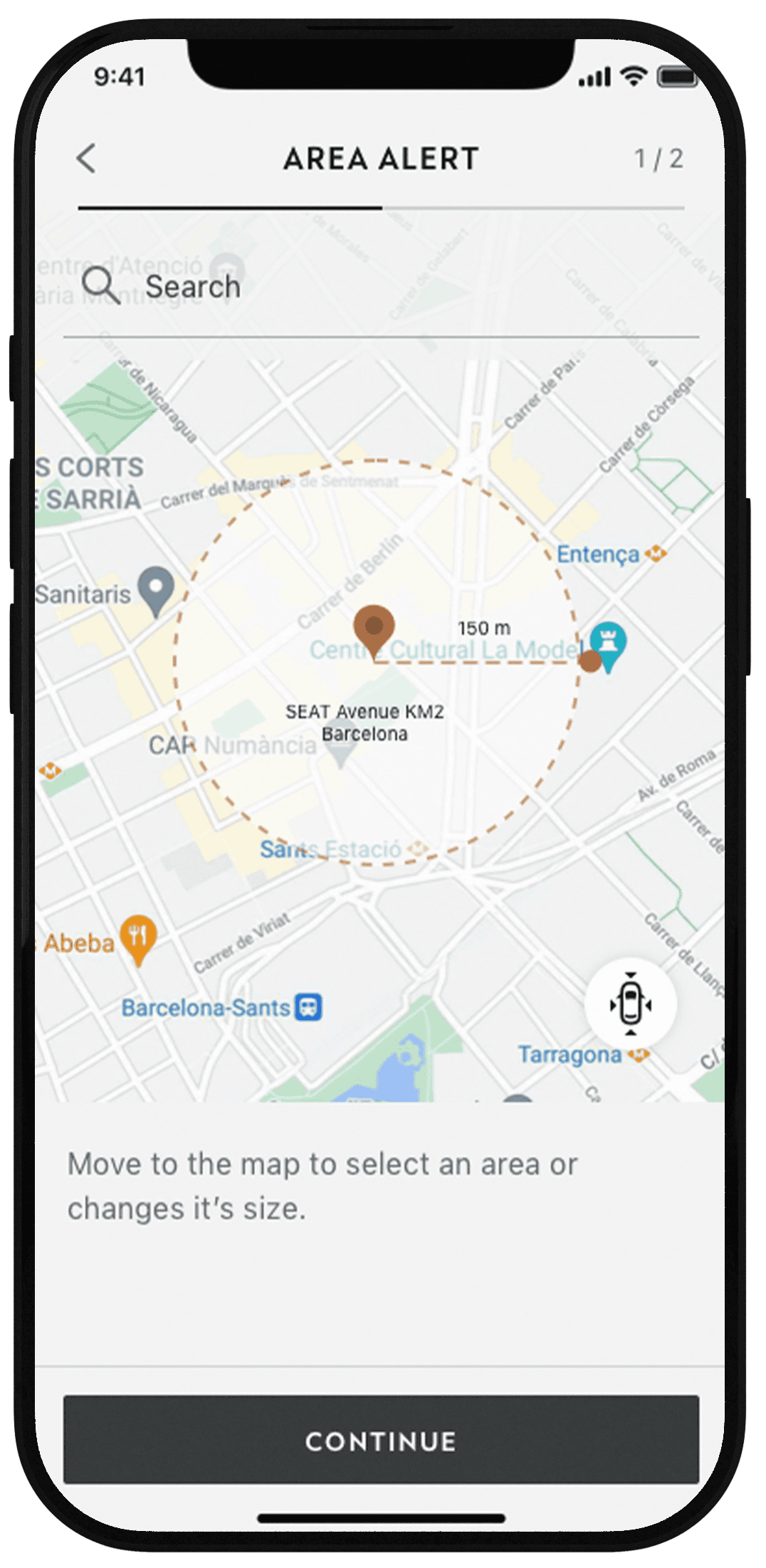
Users can draw a zone directly on the map and get notified when their car enters or exits that area. Simple concept, powerful utility—especially for parents, shared vehicles, or fleet management
Key Features:
Geolocation area selection using two-finger pinch gestures
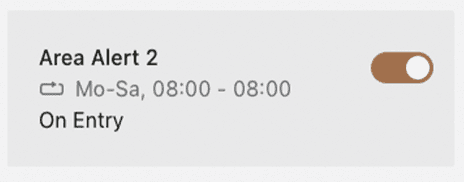
Programmed alerts that repeat on a schedule (up to 10 saved alerts)
Toggle activation for quick on/off control
Users can draw a zone directly on the map and get notified when their car enters or exits that area. Simple concept, powerful utility—especially for parents, shared vehicles, or fleet management
Key Features:
Geolocation area selection using two-finger pinch gestures
Programmed alerts that repeat on a schedule (up to 10 saved alerts)
Toggle activation for quick on/off control
Users can draw a zone directly on the map and get notified when their car enters or exits that area. Simple concept, powerful utility—especially for parents, shared vehicles, or fleet management
Key Features:
Geolocation area selection using two-finger pinch gestures
Programmed alerts that repeat on a schedule (up to 10 saved alerts)
Toggle activation for quick on/off control
Users can draw a zone directly on the map and get notified when their car enters or exits that area. Simple concept, powerful utility—especially for parents, shared vehicles, or fleet management
Key Features:
Geolocation area selection using two-finger pinch gestures
Programmed alerts that repeat on a schedule (up to 10 saved alerts)
Toggle activation for quick on/off control
Area Alerts
Area Alert
Area Alerts allow users to define a specific area directly on the map and receive notifications when the vehicle enters or exits that zone.
Key features:
Geolocation area selection using two-finger pinch gestures
Programmed alerts that repeat on a schedule (up to 10 saved alerts)
Toggle activation for quick on/off control
Area Alerts
Users can draw a zone directly on the map and get notified when their car enters or exits that area. Simple concept, powerful utility—especially for parents, shared vehicles, or fleet management
Key Features:
Geolocation area selection using two-finger pinch gestures
Programmed alerts that repeat on a schedule (up to 10 saved alerts)
Toggle activation for quick on/off control
EV Route Planner
EV Route Planner
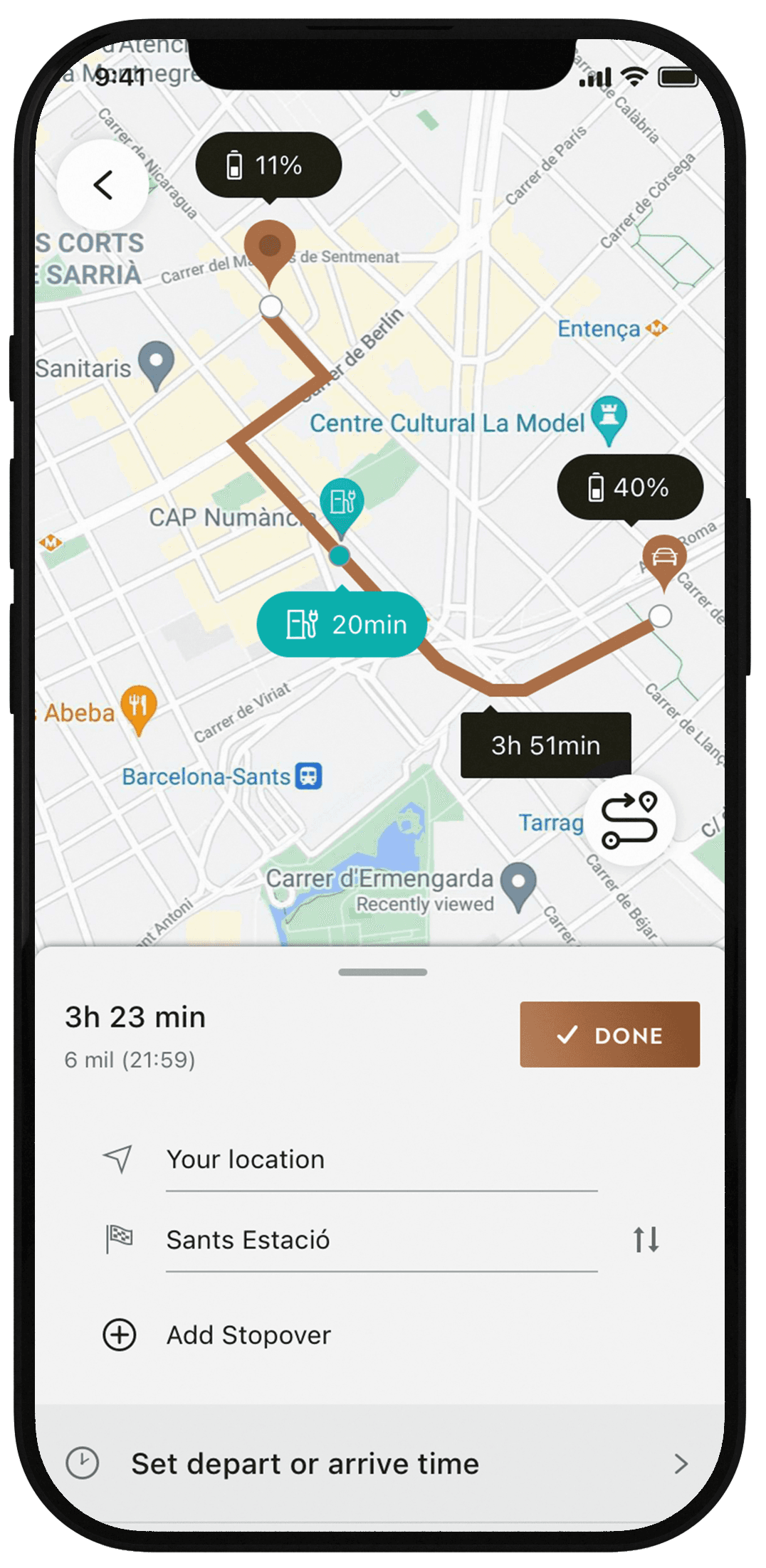
Users can create an itinerary for their electric vehicle by entering a destination, while the system automatically calculates whether the current battery level is sufficient to complete the trip
What we prioritized:
Tooltips directly on the map so route solutions are visible at a glance
Detailed information at every step: remaining autonomy, charging time, consumption
Confidence through clarity no guesswork, just facts
Users can create an itinerary for their electric vehicle by entering a destination, while the system automatically calculates whether the current battery level is sufficient to complete the trip
What we prioritized:
Tooltips directly on the map so route solutions are visible at a glance
Detailed information at every step: remaining autonomy, charging time, consumption
Confidence through clarity no guesswork, just facts
Users can create an itinerary for their electric vehicle by entering a destination, while the system automatically calculates whether the current battery level is sufficient to complete the trip
What we prioritized:
Tooltips directly on the map so route solutions are visible at a glance
Detailed information at every step: remaining autonomy, charging time, consumption
Confidence through clarity—no guesswork, just facts
EV Route Planner
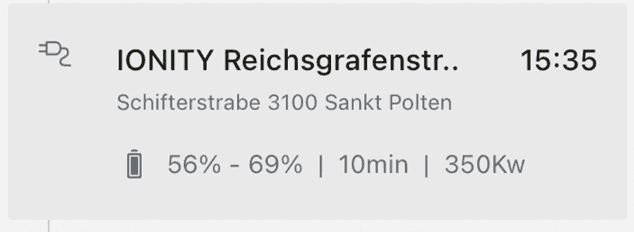
Users can create an itinerary for their electric vehicle by entering a destination, while the system automatically calculates whether the current battery level is sufficient to complete the trip
What we prioritized:
Tooltips directly on the map so route solutions are visible at a glance
Detailed information at every step: remaining autonomy, charging time, consumption
Confidence through clarity no guesswork, just facts
Testing
Testing
First, it has to work!
We didn't treat testing as a final checkbox. It was baked into the process from day one—a continuous feedback loop that informed both small tweaks and big structural decisions. Early prototypes helped us validate information hierarchy and interaction flows. Could users quickly understand their car's status? Could they complete key actions without hesitation? For the EV Route Planner, we ran controlled A/B tests using Optimizely. We tested two variants:
Full route plan with all charging details upfront
Simplified overview with optional deep-dive
We measured time to complete route planning, success rate, and engagement with charging info. The winner? A hybrid approach—clear overview with immediate access to detailed charging data when needed. Follow-up testing confirmed higher efficiency and stronger user confidence across all segments.
First, it has to work!
We didn't treat testing as a final checkbox. It was baked into the process from day one—a continuous feedback loop that informed both small tweaks and big structural decisions. Early prototypes helped us validate information hierarchy and interaction flows. Could users quickly understand their car's status? Could they complete key actions without hesitation? For the EV Route Planner, we ran controlled A/B tests using Optimizely. We tested two variants:
Full route plan with all charging details upfront
Simplified overview with optional deep-dive
We measured time to complete route planning, success rate, and engagement with charging info. The winner? A hybrid approach—clear overview with immediate access to detailed charging data when needed. Follow-up testing confirmed higher efficiency and stronger user confidence across all segments.
First, it has to work!
We didn't treat testing as a final checkbox. It was baked into the process from day one—a continuous feedback loop that informed both small tweaks and big structural decisions. Early prototypes helped us validate information hierarchy and interaction flows. Could users quickly understand their car's status? Could they complete key actions without hesitation? For the EV Route Planner, we ran controlled A/B tests using Optimizely. We tested two variants:
Full route plan with all charging details upfront
Simplified overview with optional deep-dive
We measured time to complete route planning, success rate, and engagement with charging info. The winner? A hybrid approach—clear overview with immediate access to detailed charging data when needed. Follow-up testing confirmed higher efficiency and stronger user confidence across all segments.
First, it has to work!
We didn't treat testing as a final checkbox. It was baked into the process from day one—a continuous feedback loop that informed both small tweaks and big structural decisions. Early prototypes helped us validate information hierarchy and interaction flows. Could users quickly understand their car's status? Could they complete key actions without hesitation? For the EV Route Planner, we ran controlled A/B tests using Optimizely. We tested two variants:
Full route plan with all charging details upfront
Simplified overview with optional deep-dive
We measured time to complete route planning, success rate, and engagement with charging info. The winner? A hybrid approach—clear overview with immediate access to detailed charging data when needed. Follow-up testing confirmed higher efficiency and stronger user confidence across all segments.
Final thoughts
Working on MyCupra taught me that brand identity and usability don't have to be at odds. When you respect both, and make smart, intentional decisions, you can create something that feels right—functionally and emotionally.
It's not about adding more. It's about knowing what matters, and crafting around that.
Final thoughts
Working on MyCupra taught me that brand identity and usability don't have to be at odds. When you respect both, and make smart, intentional decisions, you can create something that feels right—functionally and emotionally.
It's not about adding more. It's about knowing what matters, and crafting around that.